0x0a Complaints About Android File Systems and Why I Hate Migrating Phones
“Less” Google, Not “No” Google
I recently bought a new phone: a Google Pixel 10 Pro Fold (that just rolls off the tongue…). It’s my first Google phone. I do not like Google. The reason I purchased it is twofold (heh):
- I can run GrapheneOS on it.
- It’s foldy. I want to try new things, see if it reignites my passion for computers.
I’m a bit too old now (mainly I cbf) to be dicking around with custom ROMs like back in the day (my first phone, an LG Eve, didn’t make it to its second day of living before I had already flashed Android Froyo on it from XDA-Developers). But I hate how much Google tracks me for even simple things and don’t trust my phones anymore. It’s worse because I had a Samsung and despite never logging into a Samsung account, I’m positive it’d pump off a whole bunch of data.
Anyway, install went well. Graphene is good, seems mostly okay. I installed Google Play Services because, like I said, less Google is the plan not no Google. I’m comfortable with this level of privacy (i.e just slightly more than running AOSP) and am happy not to have Google’s AI crap shoved down my throat.
Transferring my shit
This is where everything has seemingly fallen apart. By not subscribing to Google’s backup solution (whatever that is, I’ve been backing up my own shit since day dot), setting up a new phone is ridiculously difficult. As I am a human and have to do human things (like message family members), I have various chat apps.
Won’t scan the QR code to transfer an account if you’re in dark mode. It will also fail to transfer for some reason, locking you out of the account on your old phone with seemingly no way to recover. Lucky I did actually back this up to Google Drive the morning of but it also tells me I can only restore when setting up the new phone? And if I miss it, goodbye all my stuff?
Idk, was a stressful unclear experience that left me wondering where all my messages and images were going to go. And I was particularly careful because my dad had nuked his WhatsApp accidentally a month before trying to transfer to a new phone. He’s (rightfully) quite upset about that.
Shit experience, 3/10 only because it managed to backup something.
Telegram
Easy, though I got stooged. When I signed into new phone it made me do SMS verification and gave no other options. Fine. Except it also wanted to charge me so I had to pay $2.20 (AUD) for Telegram premium for a week? I have no idea. I feel like I’ve been played considering you can just login on a desktop but whatever.
$2.20/10.
Signal
Fucking atrocious. Trying their transfer wizard, it fails halfway through which leaves your old phone disconnected from your account and your new phone with none of your shit (including your username). When your old phone is disconnected from the account, you also can’t make any backups :) Fantastic. I love this so much. New phone doesn’t have a way to try the transfer again. You have to uninstall (or completely nuke the data), then reactivate the old phone, and pray it doesn’t wipe everything. Doing the backup manually (I used to have it automatically backup once a week but you’ll find out why not in a second) took like 20min? Apparently I have 12GB worth of messages, images, and video in my Signal (I think I saw over 400k+ messages? I don’t like deleting messages unless it’s sensitive).
Using that file as the backup file on the new phone caused Signal to die with OOM error (thanks Graphene for showing me logs) but everything looked like it came through? Not that I’d know if anything was missing but it only took like 5 minutes to re-add everything.
4/10.
SMS and Call Logs
There’s so many dodgy apps for this. Tried SMS Import / Export I found on the Android FOSS list. Worked well. No issues.
10/10.
Misc
Aegis, FairEmail, MyEverythingApp (which is my personal app), all exported configs and reimported fine. Well, actually the first export of FairEmail was corrupted for some reason so I had to export again and it worked fine.
The bane of my existence - Syncthing and Android Files
Fuck me sideways - it’s 3 days after I setup this phone and I’m STILL trying to work this one out. My backup solution for my phones has been Syncthing. I just backup the whole phone (with some ignore rules) and it backs up every night I’m plugged in to charge.
I cannot express to you the shit I’ve tried and how difficult it has been to try to get this to resync. It just keeps hanging on my phone - granted, there’s like 70GB and 40k files to sync - and it did kind of okay for like 59GB. But that last 11GB will haunt my dreams like nothing else. It just kept getting stuck. Hanging on who the fuck knows what. Some sync conflicts or other crap which I’d fix (that the UI does not make known) and it would do okay for like 800Mb more (overnight) before jamming again.
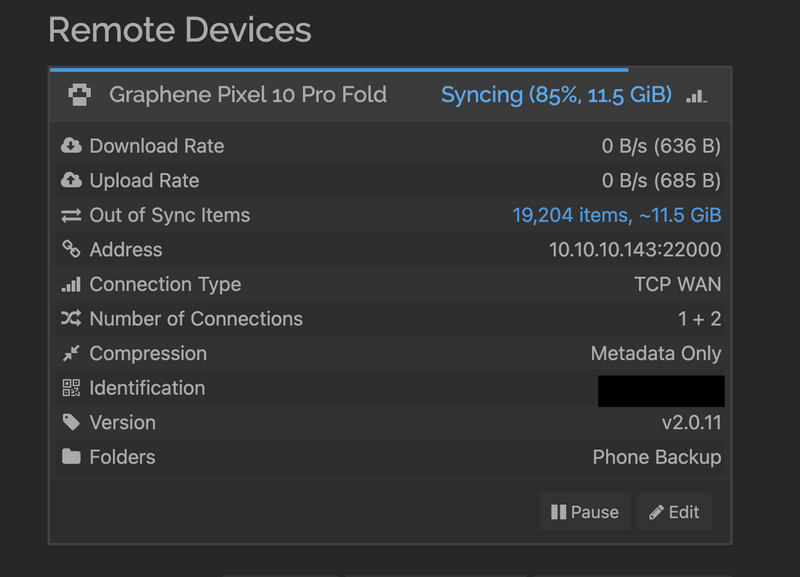
I’m not going to go over everything I tried (deleting database because there’s no reindex option, opening my firewall?, why won’t it connect locally (it sees internal Docker network as its internal network), fix all the networking issues, is it hairpin NAT? fix that zzz).
Easy bro, no worries bro I’ll just copy the files directly from my NAS. How hard can this be?
Fucking.
Just fucking fuckity fuck fuck fuck fuckers. Ever tried to copy files from a Mac (my daily driver) to an Android phone? Suck shit, you can’t.
Nope. Don’t pass go. Don’t collect $200. Fuck you for being a poor little peasant who can’t afford an iPhone (I don’t want an iPhone).
“Use OpenMTP or Android File Transfer (discontinued)”. Nope. All trash. IF you can even get OpenMTP to start copying a folder, it goes at <1MB/s. What the fuck? And I can’t specify if the file is already there, don’t overwrite it! ~ I see long wait times in my future ~
What about LocalSend? It’s okay but only saves files to Downloads. Not super helpful. I don’t want to try to move all these files out when they’re done.
Okay, just use Windows then. The phone has USB3.2 or whatever, copy the files locally to the Windows machine, and then copy it to the phone. This, dear reader, is what my current day is looking like. Except it’s still that shitass MTP or whatever that transfers at a snail’s pace! Windows, when it finally calculated the time remaining, came up with over 24hrs!!
So I end up using ADB Explorer to pump the files directly over ADB. It’s a shit piece of software - constant crashes, will lag out your entire computer when it tries to index (?) the files you’re going to send over, no retries, the settings menu doesn’t work when you’re actively copying something, you can’t navigate folders while you’re copying or the whole thing hangs up and freezes. Just absolute bullshit all around. But it copies at an average of 10MB/s so it’s currently my winning formula.
Why does Google not mount Android phones like a normal person? Why? Just why this shit? And don’t @ me, I wasn’t in “photo transfer” mode. I was in full-fledged “transfer files” mode. Just…
Conclusion
Maybe my next phone will be an iPhone and I pay for iCloud and I don’t lose 3 days of my life trying to setup a fucking phone.
Graphene is good, I’m happy with it. Installed FOSS apps where I could.
Transferring to a new phone remains a nightmare.
My passion for computers stays burnt out (though I do like having a big screen on me whenever I want… there is some joy here).
Bonus Round: @eaDir
My NAS is a Synology NAS. For some reason (and don’t start with “but you have photo or video station enabled” - I don’t), it will index all images, videos, CAD files (????), and put all the thumbnails in a folder called @eaDir with the files. That’s right - not some bloody one folder in the system but a folder EVERYWHERE it finds these file types. So you end up having @eaDirs sprinkled through the entirety of your shit. It’s fucking insane.
sudo systemctl mask synomkthumbd and making sure nothing is indexing is a start. Then you can go delete everything with this shitty line: find . -iname @eaDir -exec sudo rm -rfv "{}" \;.
Bonus Bonus Round: I’m holding it wrong
“40k files but only 70GB of data, you’re copying little shitty files and whatever!” Probably and I will be tuning my ignore list as soon as this is resovlved. But that doesn’t help me with the here and now of I need all my stuff to sync and keep syncing!